What Is a QR Code Souvenir? A Simple Guide to iTripe
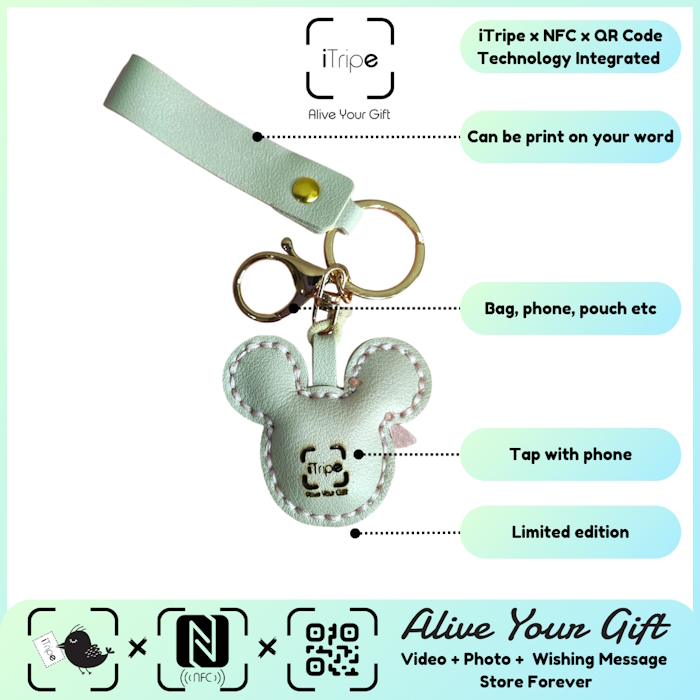
A QR code souvenir is a physical keepsake with a code that connects to a digital experience. With iTripe, that experience can include a personal message, photo and video prepared for the person receiving the gift.
Instead of trying to fit everything you want to say on a small card, you can make the physical souvenir the starting point of a story. The recipient keeps the object and uses its QR code or NFC feature to discover the memory attached to it.
What does the recipient actually see?
After you prepare and activate the gift, the recipient can scan the QR code or tap NFC to view the content you supplied. Think of a birthday greeting recorded in your own voice, a photograph from a shared holiday, or a message explaining why a particular moment means so much to you.
The physical design and the personal content do different jobs. The design makes the gift attractive to keep; the message makes it recognisable as something chosen for that person.
How to prepare an iTripe gift
- Open the gift's activation page. Follow the QR code or NFC instructions supplied with the gift.
- Prepare your content. Fill in the requested details and add your message, photo and short video.
- Check everything. Review spelling, names and the media you selected before proceeding.
- Activate with the unlock code. Follow the on-screen instructions and use the code supplied with your gift.
- Give or post the gift. Include a note telling the recipient how to discover the memory.
For the detailed walkthrough and demonstration videos, open the iTripe FAQ before you begin.
QR code or NFC: which should I use?
Use the method that works with your phone and the gift you have. Start by trying the QR code with your phone's camera or QR scanning feature. If you use NFC, follow your phone's instructions for enabling it and finding the scanning area.
If tapping does not open the page, try scanning the QR code instead. If you still cannot open or activate the gift, contact iTripe through the contact page. Avoid repeatedly entering codes you are unsure about.
Can I change the message later?
The current iTripe FAQ says that content cannot be changed after activation. Treat activation as the final step, rather than the start of editing. Read your message aloud, open the photo you intend to use, and watch your video once before confirming.
Save a copy of the message and original files on your own device. Also choose media you are comfortable sharing with the recipient and anyone they may show the gift to. Do not put passwords, identity documents or other sensitive information into a gift message.
Who is this kind of souvenir for?
It can suit travellers who want to share a moment with family, couples celebrating a shared experience, or friends sending a personal greeting from far away. You do not need an elaborate occasion: a sincere message is enough to give the gift a clear meaning.
Browse the iTripe collection and check each product's current details before choosing your souvenir.

